
What Is a Carbon Ledger?
If you’ve ever tried to defend a carbon number to an auditor, you already know the problem. Someone asks where a figure came from. Often, the honest answer involves a utility bill, a rough estimate, and a formula nobody quite remembers building. A carbon ledger fixes that gap. So it’s worth understanding before your next reporting cycle puts you on the spot.
A carbon ledger keeps a permanent, transaction level record of how each emissions figure was calculated. It also records exactly where that figure came from. A financial ledger records every transaction that rolls up into your financial statements. In the same way, a carbon ledger records every calculation that rolls up into your GHG inventory. Every number traces back to a source.
That’s the concept. Here’s what it looks like inside CarbonSuite, and why building it natively inside NetSuite changes what’s possible.
Why Traceability Is Becoming Non-Negotiable
Disclosure frameworks are converging on the same expectation: show your work. California SB 261, Australia’s mandatory climate reporting under ASRS, and the Science Based Targets initiative all expect organizations to support their numbers with evidence, not just report a total. As assurance requirements tighten across these frameworks, a carbon ledger with a clear audit trail is quickly becoming table stakes for anyone disclosing emissions data, built on the same GHG Protocol Corporate Standard that underpins most global reporting frameworks.
How CarbonSuite’s Carbon Ledger Works
CarbonSuite is built natively inside NetSuite. So the carbon ledger lives directly on top of the accounting data you’re already recording.
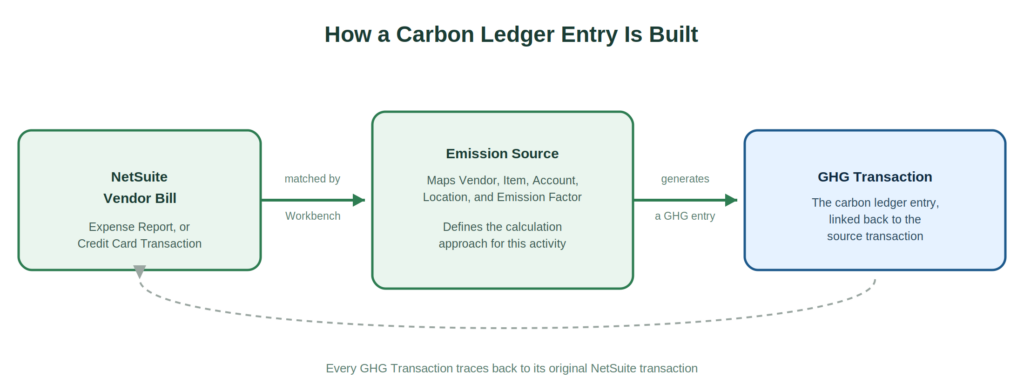
Every emission calculation starts as an Emission Source. Think of an Emission Source the way you’d think of an Item record in NetSuite. It’s a reference record that maps a category of emissions, like purchased electricity from a specific vendor. That mapping points to a set of NetSuite fields: the Vendor, the Item, the GL Account, the Location, the Subsidiary, or the Expense Category involved. Once that mapping exists, CarbonSuite knows how to recognize that kind of transaction whenever it appears.
The Emission Workbench does the matching automatically. This engine scans your NetSuite Vendor Bills, Expense Reports, Shipping Transactions, and other transaction types. Then it finds the ones that match an existing Emission Source. As a result, it creates a GHG Transaction for each match. That GHG Transaction carries a direct reference back to the NetSuite transaction it came from. It points down to the specific bill, line, vendor, and dollar amount.
The financial record and the emissions record are the same event, viewed two ways. That’s what makes this a ledger rather than a report. The Vendor Bill you already recorded for financial purposes is the same record that drives the emissions calculation. So there’s no second data entry, no separate upload, and no reconciliation between two versions of the truth. One transaction, recorded once, supports both your books and your GHG inventory.
What This Looks Like in an Audit
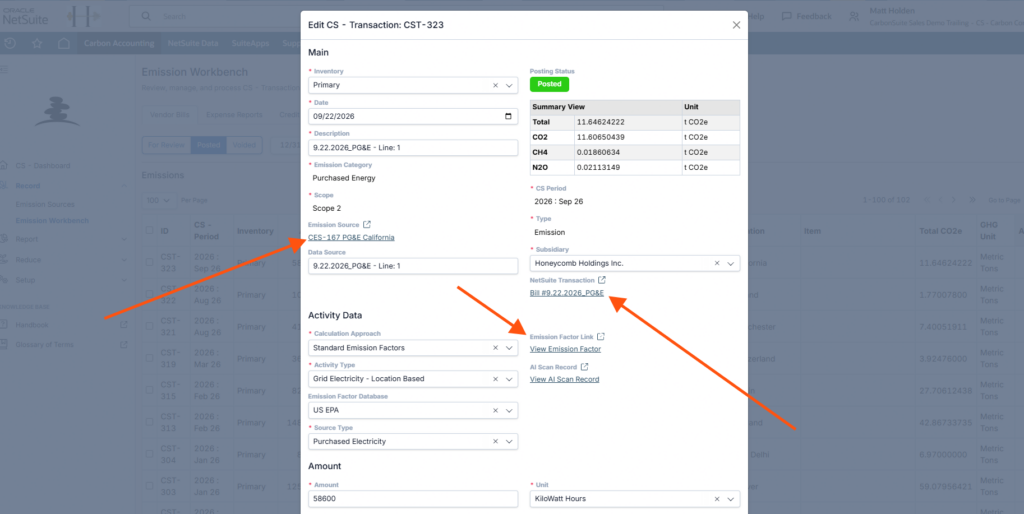
Picture a reporting cycle where an auditor asks how you calculated Scope 2 emissions from purchased electricity for a specific facility last quarter. With a carbon ledger, the answer is straightforward: pull up the GHG Transaction, follow the link back to the Emission Source that defines the calculation method and emission factor, then follow the link back to the original Vendor Bill that supplied the activity data. Every step of that chain is a real record in the same system, with a timestamp and an owner behind it. That’s what makes a number defensible and gets you through an audit.
Frequently Asked Questions
What is a carbon ledger?
A carbon ledger is a permanent, transaction level record of how each greenhouse gas emissions figure was calculated. It includes the source data, the calculation method, and the emission factor used. It works like a financial ledger, but for emissions instead of dollars.
How is a carbon ledger different from a carbon footprint report?
A carbon footprint report is a summary output, a total for a period. A carbon ledger is the underlying record that makes that total traceable and auditable, transaction by transaction.
Why does tying emissions to NetSuite transactions matter?
Your emissions data and your financial data stay in sync automatically. The same Vendor Bill, Expense Report, or Credit Card Transaction that supports your financial statements also supports your GHG inventory. A direct link connects the two.
Does this replace the need for a sustainability team?
Someone still needs to define Emission Sources and review results flagged in the Emission Workbench. They’ll also make judgment calls on things like base year recalculation. What a carbon ledger removes is manual data re-entry and the guesswork of reconstructing a calculation after the fact.
Is this specific to NetSuite users?
Yes. CarbonSuite is built natively inside NetSuite, so the carbon ledger draws on transactions you’re already recording. There’s no need for a separate data feed.
If your organization already runs on NetSuite, here’s the question worth asking. When your auditor asks where a number came from next reporting cycle, do you want the answer to be a memory, or a link? Get in touch and we’ll walk you through what a carbon ledger looks like for your data.
